The cast
Meet the cuties
16 species of hand drawn 16 bit pixel art. Each one moves its own way and has its own trick. Tako, Sprout and Wisp come with the app, and you can make any of the others in Pal Hub.
Click a cutie to let it out
Features
What they do
They just live on your screen and keep you company. Nothing to feed, nothing to look after. The ones on this page do most of it too.
Getting around
- Walk along the bottom of your screen, even across monitors
- Hop onto your windows and jump from one to the next
- Climb up the sides of windows
- Ride on top of a window while you drag it. Shake it hard and they go flying!
- Grab the menu bar and walk upside down under it, or climb inside it (even behind the notch)
- Sit on window edges with their legs dangling
- Peek: slip behind a window, then peek back over the edge with just their eyes
Hanging out together
Have a bunch of them out at once.
- Play tag: one chases, one runs, then they swap
- Walk over to chat, trade little hearts and notes, or go for a high five
- Sit side by side, or join a friend who's chilling by the campfire
- Nap piles: a sleepy cutie curls up next to one that's already asleep
- Stacking: one hops on another's head and rides along
Little moments
- Fall asleep when you step away, then hop up and say hi when you're back (try it here: leave this tab for a minute)
- Turn to look at your cursor when it comes close, and stop walking when you hover so they're easy to grab
- Yawn, blink, look around and show little emotes: hearts, music notes, sparkles, and a "!" after a big fall
- Sleepier late at night, a big stretch in the morning
- Set your birthday and they throw you a little party that day
- Get tired and slow when your laptop battery is low
Chill time
Every now and then a cutie pulls something out and takes a break right there on your screen.
- Kicks back in a beach chair
- Lights a campfire and dozes off
- Goes fishing (sometimes they bite)
- Reads a good book
- Strums a little guitar
- Plays a handheld game
Make your own
Make them yours
Open Pal Hub from the paw in your menu bar. Pick a species, dress it up, name it and set its energy, all with a live animated preview.
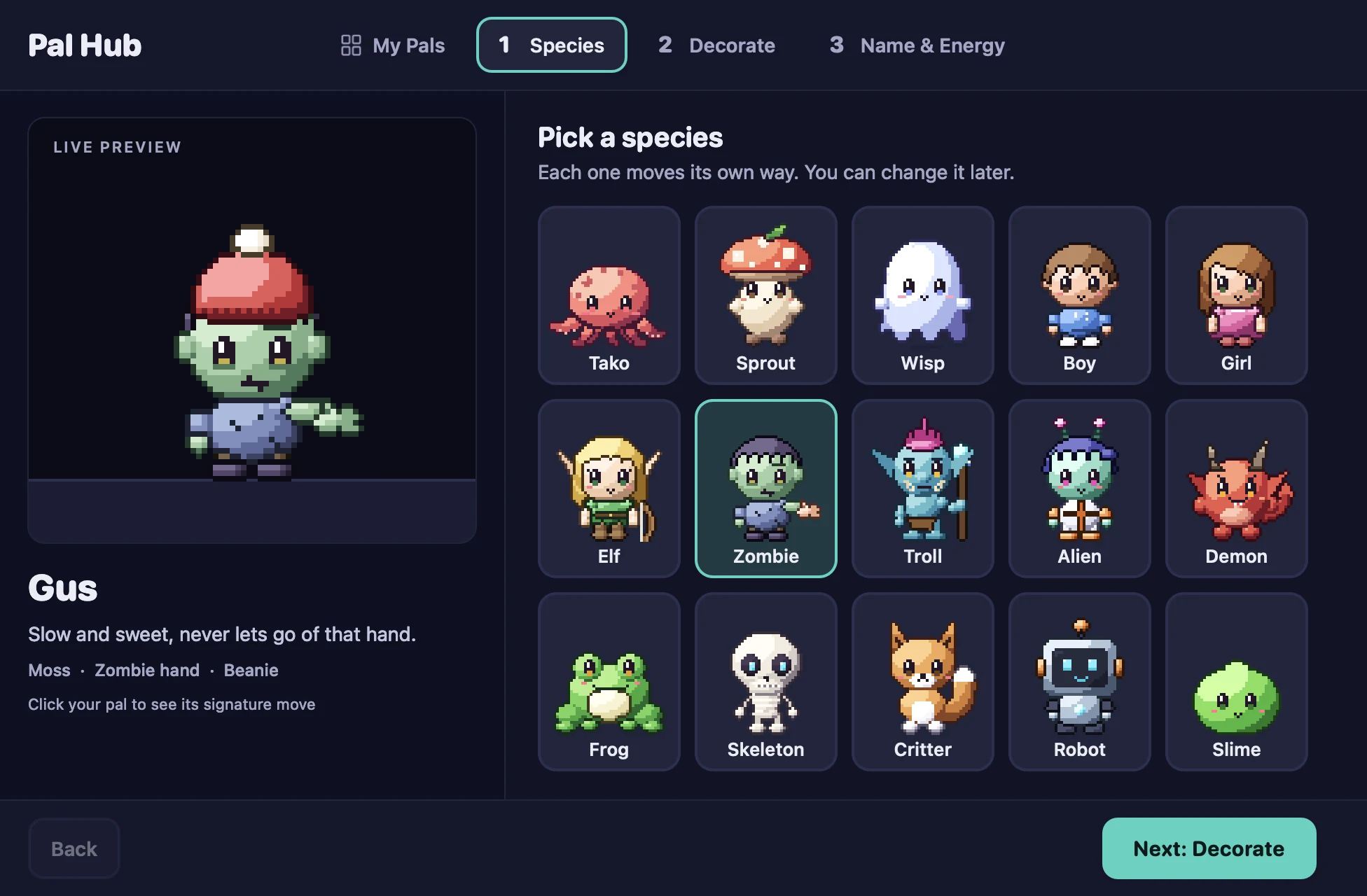
A few cuties made in Pal Hub. Mix and match your own!
- 16species
- 77decorations
- 4+colors each
- 100names to roll
- Species
- Tako, Sprout, Wisp, Boy, Girl, Elf, Zombie, Troll, Alien, Vampire, Demon, Frog, Skeleton, Critter, Robot, Slime
- Six slots
- Face, Mask, Hat, Head extra, Back extra and Sparkle, with about 13 picks each: from glasses, freckles and a mustache to cowboy hats, antlers, fairy wings, a jetpack, confetti and fireflies
- A special part
- Every made species has one more thing to recolor: the zombie's hand, the elf's bow, the troll's mohawk, the vampire's cape lining and more
- Energy
- Chill (stays put, naps, pulls out a beach chair), Normal (a bit of everything) or Hyper (always on the move)
- Name it yourself, or roll the dice for one of 100 names
- Five sizes, from Extra Small to Extra Large, for everyone or each cutie
- Edit any cutie later, even the starter three
Friends
Send a cutie to visit a friend
Every cutie has a short pal code. Send it any way you like: text, email, a DM. No accounts and no internet needed. The code is the whole cutie.
-
1
Copy your code
In Pal Hub, press the copy button next to your cutie.
CC-F9QPTRK9CNY62WV8FHKQ4… -
2
Send it
Paste it into a text, an email or a group chat.
-
3
They pick: keep or visit
Your friend presses Enter Pal Code. They can keep your cutie, or invite it over to hang out with theirs for a while before it heads home.
Controls
You're in control
They're free spirits, but you're the boss. Try these on the cuties walking around this page.
Drag, toss, click
Drag them anywhere, toss them, or click one for a trick. Hover a walking cutie and it stops so it's easy to grab. Fling one up high and it grabs the menu bar.
Right click a cutie
Every cutie has its own menu.
Choose where they hang out
- Anywhere
- Bottom Only
- Top Only (menu bar)
- Any of the four corners
- Stay Right Here
Pause or hide
Pause them or hide them anytime from the paw icon in the menu bar.
Open at Login
Turn it on and your cuties show up every time you log in.
Pick a size
Extra Small, Small, Medium, Large or Extra Large. Always pixel crisp. Set it for everyone or for each cutie.
- Small
- Medium
- Large
- Extra Large
Privacy
Private by design
Computer Cuties was built so anyone can install it without worrying.
Asks for zero permissions
No Accessibility, no Screen Recording, no Input Monitoring, no camera, no microphone.
Never goes online
The app has no internet access at all. No accounts, no analytics, no tracking, no ads. Pal codes travel however you send them.
Doesn't look at your stuff
It only knows where your windows are and how big they are, so cuties can stand on them. It never reads window titles, app names or anything on your screen.
Doesn't watch your typing
To know when you've stepped away, it only asks macOS "how many seconds since the last input." No keystrokes are ever seen or logged. When cuties look at your cursor, they read where it is right then and never save it.
Sandboxed
Runs inside Apple's App Sandbox.
Tiny on battery
About 1% of one CPU core while walking, close to zero while napping, and nothing at all when hidden or paused.
Only saves your settings
The cuties you made and how they look, sizes, which ones are out, where they hang out, and your birthday's month and day if you enter it. Visiting cuties are never saved. That's it.
Same goes for this website: no cookies, no trackers, no analytics.
FAQ
Questions?
The short answers, cutie style.
Is it free?
Yes! Computer Cuties is completely free. Nothing locked, nothing to buy.
Why does my Mac warn me the first time I open it?
Computer Cuties isn't from the App Store and isn't notarized by Apple yet, so macOS asks you to confirm once. It's a normal step for indie apps. The download section walks you through it. After that it opens like any other app.
Does it slow down my Mac?
Nope. It uses about 1% of one CPU core while the cuties walk, close to zero while they nap, and nothing at all when they're hidden or paused.
Does it need internet or permissions?
No and no. It never goes online and asks for zero permissions.
How do I share a cutie with a friend?
Open Pal Hub, press the copy button next to your cutie, and send the code however you like. Your friend opens Pal Hub, presses Enter Pal Code and pastes it. They can keep it, or invite it over for a visit.
I had Desktop Pals. Is this the same app?
Yes! Desktop Pals is now called Computer Cuties. Install the new version and your cuties and settings come right along. Old pal codes that start with DP3 still work. Then quit Desktop Pals and drag the old copy from Applications to the Trash.
Which Macs does it work on?
Any Mac with Apple Silicon (M1 or newer) running macOS 13 Ventura or newer.
How do I quit it?
Click the paw icon in the menu bar, then choose Quit Computer Cuties.
How do I uninstall it?
Quit it, then drag Computer Cuties from your Applications folder to the Trash. All done.
Get your cuties
Free for your Mac. Ready when you are.
Download for MacVersion 0.7 · 6 MB · Free · macOS 13+ · Apple Silicon
- No permissions
- Never goes online
- No account
Opening it the first time
Computer Cuties isn't notarized by Apple yet, so your Mac will warn you once. That's expected. Here's how to say "yes, I trust this":
- Unzip and move it. Double click the download to unzip it, then drag Computer Cuties into your Applications folder.
- Open it once. Double click Computer Cuties. macOS says it can't check the app. Click Done (or OK). Don't move it to the Trash.
- Allow it. Open System Settings, go to Privacy & Security, and scroll down. Next to "Computer Cuties was blocked", click Open Anyway, then confirm with your password or Touch ID.
- Meet your cuties. Look for the paw in your menu bar. From now on it opens like any other app.
On macOS 13 or 14 there's a shortcut: right click (or Control click) the app, choose Open, then click Open again.